
- Created by Silvan Frey on Jul 15, 2026 6 minute read
You have English selected as language but this page has not been translated yet. Translate the page or view the content in the default space language below.
Display defaultProject Configuration
VicSDK requires following Info.plist Keys to function as intended.
<key>NSCameraUsageDescription</key>
<string>YOUR_CUSTOM_REASON_TO_ACCESS_CAMERA</string>
<key>NFCReaderUsageDescription</key>
<string>YOUR_CUSTOM_REASON_FOR_READING_NFC_TAGS</string>
Key | Verwendungszweck in VicSDK |
|---|---|
NSCameraUsageDescription | Wird für das Checkin via QR Code verwendet |
NFCReaderUsageDescription | Wird für das Checkin via NFC Tag verwendet |
VicSDK Configuration
Configuration should happen early in Application lifecycle. We recommend adding the functionality to configure VicSDK to your AppDelegate.
import Foundation
import VicSDK

class AppDelegate: NSObject, UIApplicationDelegate {
  func application(_ application: UIApplication, didFinishLaunchingWithOptions launchOptions: [UIApplication.LaunchOptionsKey: Any]? = nil) -> Bool {
    // configure early in Application lifecycle
    configureVicSDK()
	return true
  }
}

private func configureVicSDK() {
  // Define VicSettings
  VicSettings.Icon.info.color = UIColor(named: "MY_COLOR")
  VicSettings.Typography.FontFamily.regular = MyCustomFonts.regular
  VicSettings.Typography.TextStyle.pageTitle.size = MyCustomTextStyles.pageTitle.size

  let image = UIImage(named: "YOUR_CARD_DESIGN")
  VicSettings.Card.setImage(image: image)

  // omit passConfig if no wallet functionality wanted
  VicSettings.passConfig = PassConfig(iconImage: UIImage.passIcon,
                                            logoImage: UIImage.sanacurLogoDummy,
                                            foregroundColor: "#000000",
                                            backgroundColor: "#FFFFFF",
                                            labelColor: "#000000")
}
VicSDK Card Presentation Flow![]()
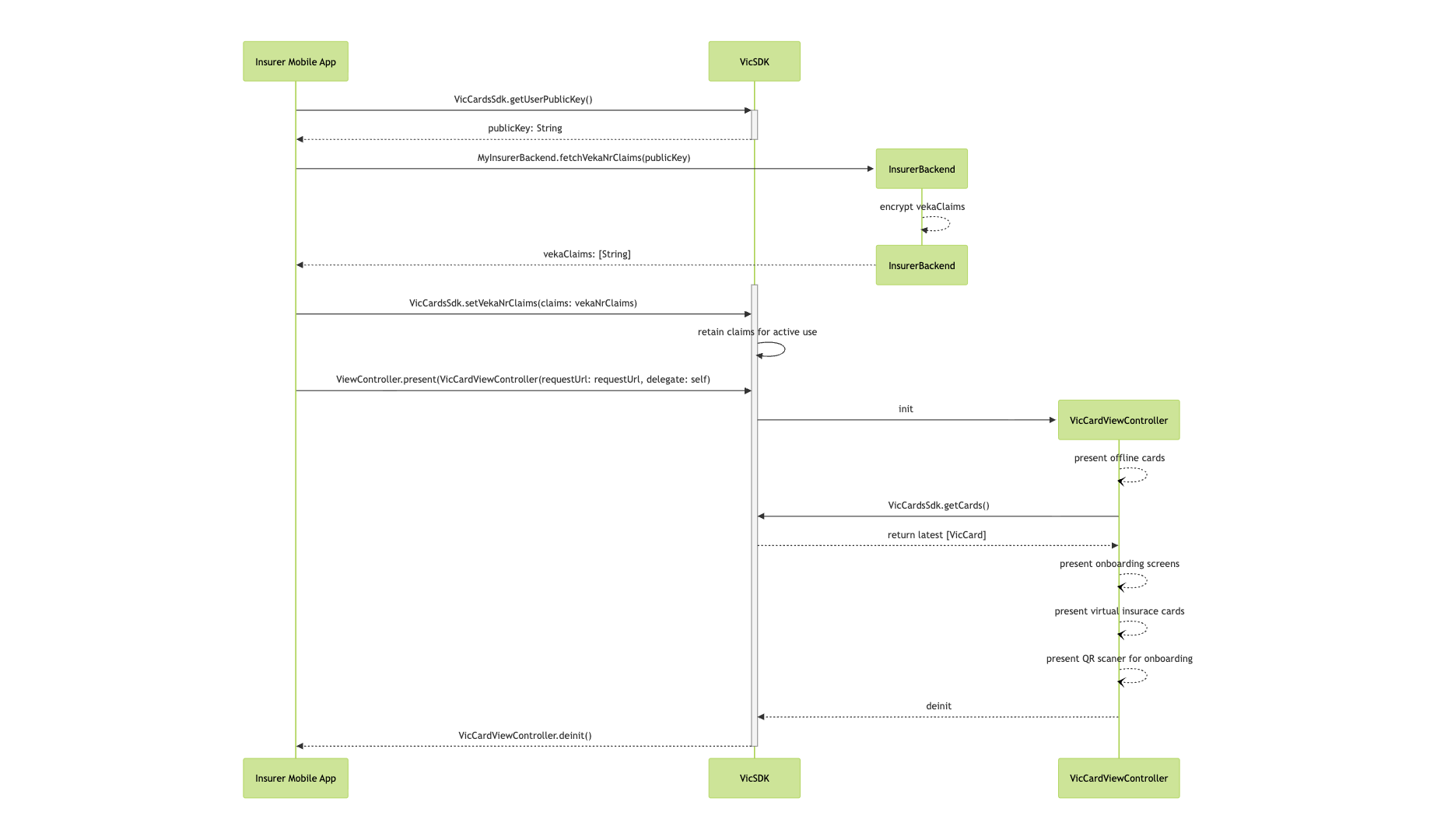
The original mermaid diagram can be found here.
Prepare VicSDK
Before showing the user’s cards, the insurer application needs to fetch the user’s VekaNr claims from the insurer backend service and pass them to the VicSDK. The Insurer backend expects a public key which is provided by VicCardsSDK.getUserPublicKey() funtion.
The list of VekaNr claim has to be provided as a JSON array of public PASETOs v2, with one PASETO corresponding to one VekaNr claim. This enables the VicSDK to authenticate to the SASIS server and fetch the data of all the cards.
After fetching the VekaNr claims, pass them to the VicCardsSdk by calling the VicCardsSdk.setVekaNrClaims() function.
guard let publicKey: String = VicCardsSdk.getUserPublicKey() else {
  logger.error("❌ no public key")
  return
}

guard let claims: [String] = try? await MyInsurerBackend.fetchVekaNrClaims(publicKey) else {
  logger.error("❌ no claims returned")
  return
}

VicCardsSdk.setVekaNrClaims(claims: claims)
Present Cards
The cards of all the family members can be shown by the VicSDK. These can then be used to scan a QR code and transmit a signed/verified version of the card to a third party such as a hospital.
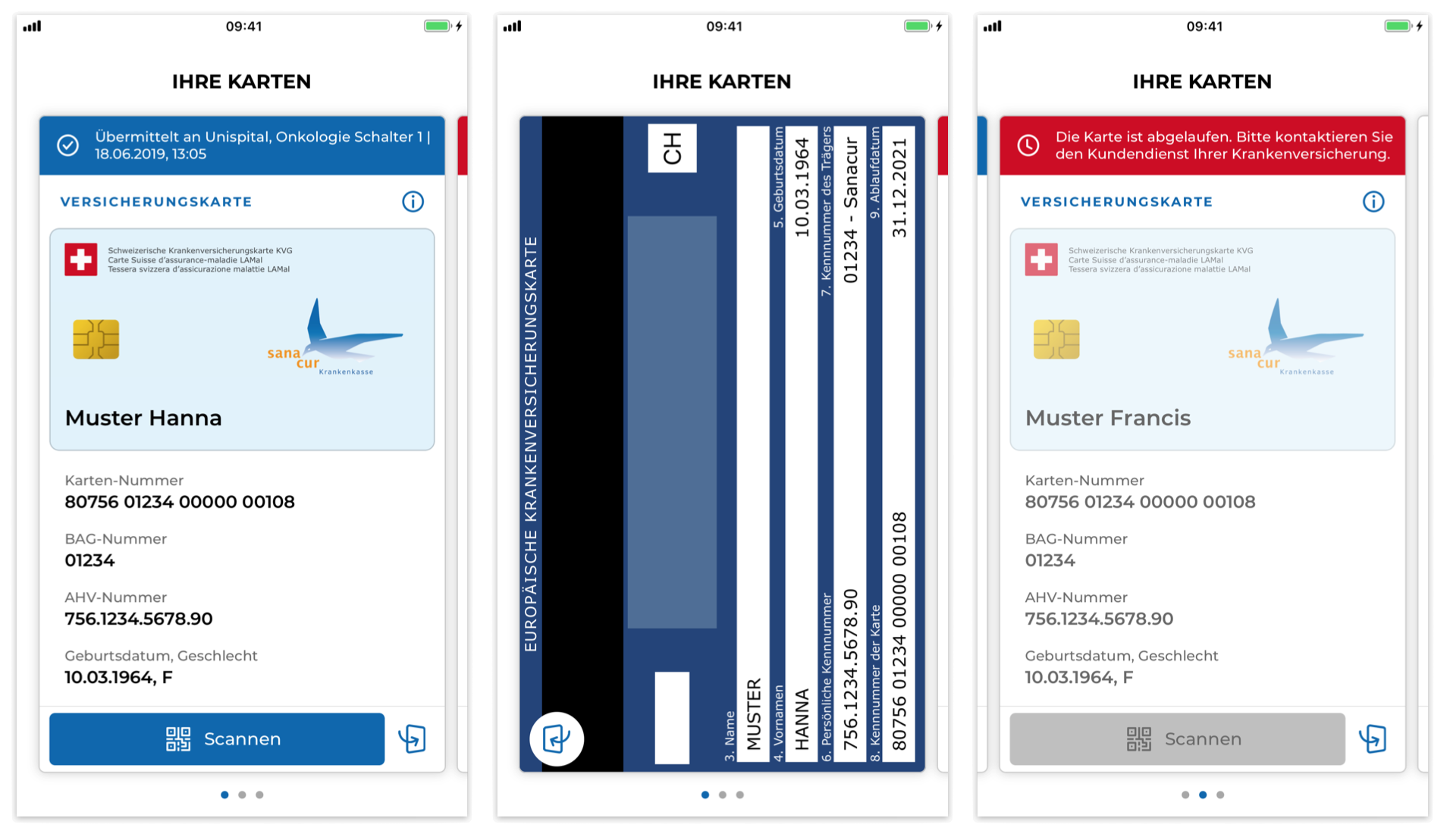 Virtual Insurance Card front-, backside and invalid card
VicSDK in UIKit Apps
Present the VicCardViewController as a child ViewController.
private var vicRequestUrl: String? = nil


override func viewDidLayoutSubviews() {
    if (YOUR_CARD_VIEW.subviews.isEmpty) {
        self.addVicCardsSubview()
    }
}

func addVicCardsSubview(hideTutorialScreens: Bool, listItemOrder: [VicSDK.VicCardListItem]) {
    let cardViewController = VicCardViewController(requestUrl: vicRequestUrl)
	cardViewController.view.frame = cardView.layer.bounds
    cardViewController.isScrollEnabled = false // use Buttons instead of swipe gesture
    cardViewController.hideTutorialScreen(hideTutorialScreens)
    cardViewController.defineCardListItemOrder(listItemOrder)
    addChild(cardViewController)
    YOUR_CARD_VIEW.addSubview(cardViewController.view)
}
VicSDK in SwiftUI Apps
Create a UIViewRepresentable to create a View that can be presented in a SwiftUI Application.
import Foundation
import SwiftUI
import VicSDK

struct VicCardsView: UIViewControllerRepresentable {
    var requestURL: String?
	var hideTutorialScreens: Bool
	var listItemOrder: [VicSDK.VicCardListItem]

    func makeUIViewController(context: Context) -> VicCardViewController {
        let cardViewController = VicCardViewController(requestUrl: requestURL, delegate: context.coordinator)
		cardViewController.isScrollEnabled = true // use swipe gesture instead of Buttons
    	cardViewController.hideTutorialScreen(hideTutorialScreens)
	    cardViewController.defineCardListItemOrder(listItemOrder)
		return cardViewController
    }

    func updateUIViewController(_ uiViewController: VicCardViewController, context: Context) {
    }

    func makeCoordinator() -> Coordinator {
        Coordinator()
    }
}

final class Coordinator: NSObject, VicCardDelegate {
	func cardsUpdateFinished(errors: [VicSDK.VicError]) {
        // handle card updates here
    }

    func didSelectCardAt(index: Int) {
        // handle custom actions on card selection
    }

    func didSelectCardWith(number: String) {
        // handle custom actions on card selection
    }
}
Handling local cached files in VicSDK
As the cards will be saved offline, you need to call the following function to delete all card data in case of a logout. Make sure Prepare VicCardsSdk is called after user login.
VicCardsSdk.deleteAll()
Universal Links
Universal Links allow the user to scan the check-in QR code provided by health care institutions with VicSDK. Alternatively the user can use the NFC functionality to start the check-in process by simply tapping the top of the phone to where the NFC Tag is located.
Add following Entitlement file to your app and make sure it is assigned to your apps target. This will allow your app to handle NFC Tags and to suggest your app being opened when certain URLs are called. Further send your app ids (in the format of <YOUR_TEAM_IDENTIFIER>.<YOUR_BUNDLE_IDENTIFIER>, e.g. `sampleapp.sasis.ch`) to your contact person from SASIS. We will add your app ids to the `apple-app-site-association` file on the servers. This allows your app to handle the universal links.
<?xml version="1.0" encoding="UTF-8"?>
<!DOCTYPE plist PUBLIC "-//Apple//DTD PLIST 1.0//EN" "http://www.apple.com/DTDs/PropertyList-1.0.dtd">
<plist version="1.0">
<dict>
	<key>com.apple.developer.associated-domains</key>
	<array>
		<string>applinks:vvk-online.ch</string>
		<string>applinks:www.vvk-online.ch</string>
	</array>
	<key>com.apple.developer.nfc.readersession.formats</key>
	<array>
		<string>TAG</string>
	</array>
</dict>
</plist>
Following links provide in depth documentation on Universal links and its requirements.
Team Identifier: https://developer.apple.com/help/glossary/team-id/
Bundle Identifier: https://developer.apple.com/help/glossary/bundle-id/
For UIKit Apps, handle the data received from the universal link or NFC tag in your `UIWindowSceneDelegate`. Change handleVicLink(requestUrl:) to your applications needs.
import UIKit
class SceneDelegate: UIResponder, UIWindowSceneDelegate {

    var window: UIWindow?

    func scene(_ scene: UIScene, willConnectTo session: UISceneSession, options connectionOptions: UIScene.ConnectionOptions) {
        guard let windowScene = scene as? UIWindowScene else { return }
        window = UIWindow(windowScene: windowScene)

        // Handle any user activities passed at launch
        if let userActivity = connectionOptions.userActivities.first {
            handleUserActivity(userActivity)
        }
    }

    func scene(_ scene: UIScene, continue userActivity: NSUserActivity) {
        handleUserActivity(userActivity)
    }

    private func handleUserActivity(_ userActivity: NSUserActivity) {
        guard userActivity.activityType == NSUserActivityTypeBrowsingWeb else {
            return
        }

        if let webPageUrl = userActivity.webpageURL {
            handleVicLink(requestUrl: webPageUrl.absoluteString)
        } else if let ndefRecord = userActivity.ndefMessagePayload.records.first(where: { $0.typeNameFormat != .empty }),
                  let requestURL = String(data: ndefRecord.payload, encoding: .utf8) {
            handleVicLink(requestUrl: requestURL)
        }
    }

    func handleVicLink(requestUrl: String) {
        guard let vc = UIStoryboard(name: "Main", bundle: nil).instantiateViewController(withIdentifier: ApiService.isUserLogged ? NavControllers.myCards : NavControllers.login) as? BaseNavigationController else {
            return
        }
        vc.requestUrl = requestUrl

        window?.rootViewController = vc
        window?.makeKeyAndVisible()
    }
}
The SwiftUI equivalent would look as follows.
import SwiftUI
import VicSDK


@main
struct VicardApp: App {

    @StateObject private var appRouter = AppRouter()

    var body: some Scene {
        WindowGroup {
            RootView()
                .environmentObject(appRouter)

				// Universal Links (https://...)
                .onOpenURL { url in
                    appRouter.handleVicLink(requestUrl: url.absoluteString)
                }

                // Universal Links + NFC (NSUserActivity)
                .onContinueUserActivity(NSUserActivityTypeBrowsingWeb) { userActivity in
                    appRouter.handle(userActivity: userActivity)
                }
        }
    }
}

final class AppRouter: ObservableObject {

    @Published var route: AppRoute = .initial

    func handle(userActivity: NSUserActivity) {
        guard userActivity.activityType == NSUserActivityTypeBrowsingWeb else {
            return
        }

        if let webPageUrl = userActivity.webpageURL {
            handleVicLink(requestUrl: webPageUrl.absoluteString)
            return
        }

        if let ndefRecord = userActivity
            .ndefMessagePayload?
            .records
            .first(where: { $0.typeNameFormat != .empty }),
           let requestURL = String(data: ndefRecord.payload, encoding: .utf8) {
            handleVicLink(requestUrl: requestURL)
        }
    }

    func handleVicLink(requestUrl: String) {
        if ApiService.isUserLogged {
            route = .myCards(requestUrl)
        } else {
            route = .login(requestUrl)
        }
    }
}
- No labels